

November 17, 2026
We’re Always Listening: New Updates to Make Your Silvercell Experience Easier
At Silvercell Wireless, we believe staying connected should be simple and secure. That means making it easier to manage your phone service, change your payment method, keep your account up to date, and get help when you need it, while also taking steps to protect your personal information and phone service.
We’re always listening to our customers and looking for ways to improve. Based on customer feedback and our commitment to account security, we’ve made several updates to our website and My Account section. These improvements give you more control over your service, add another layer of protection to your account, and make everyday tasks easier to handle on your own.
Here’s a look at what’s new!
An Extra Layer of Protection for Your Account
Protecting your personal information and phone service has always been a priority at Silvercell. While we’ve already had security measures in place to help safeguard your account, we’ve added another layer of protection with a new verification PIN.
This added security helps protect sensitive account information and makes it more difficult for bad actors to make unauthorized changes to your account or phone service, including fraudulent SIM swaps or phone number transfers.
What does this mean when you log in?
We’ve made the login process simple while adding this extra protection. Here’s how it works:

- Visit the My Account section on the Silvercell website.
- Enter the email address or primary phone number associated with your Silvercell account.
- A verification PIN will be sent immediately.
- Enter the PIN when prompted to access your account.
This additional verification step helps ensure that access to sensitive account information is better protected. It’s one more way we’re working to keep your account and phone service secure.
A New and Improved My Account Experience
We’ve given the My Account section a new look and added more features so you can take care of more things without having to contact customer support. Whether you need to update your information, check an order, or make changes to your phone service, you now have more options right at your fingertips.
Here are some of the updates you can take advantage of:
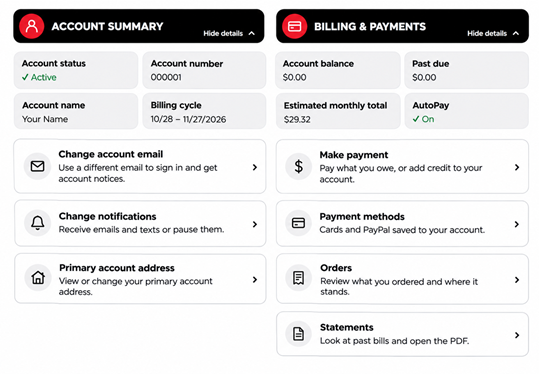
Manage Your Account Information
You can now make several account changes on your own, whenever it’s convenient for you.
- Update your email address: Change the email associated with your Silvercell account without needing to contact support.
- Change your notification preferences: Choose how you would like to receive account notifications.
- Update your address: Change your primary account address and service address directly through your account. Your service address is especially important because it determines the taxes calculated for your service.
View Billing and Statements
Keeping track of your purchases and payments is easier than ever.
- Order history: Review your past orders, including phone and SIM purchases, all in one place.
- Manage saved payment methods. Quickly update the saved payment methods on your account with just a few clicks.
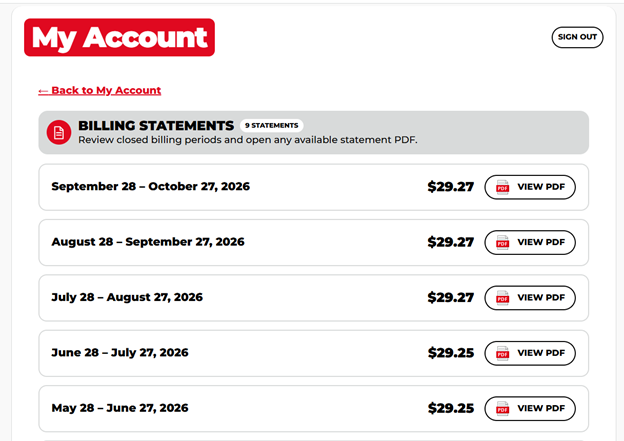
- Download statements: View your account statements and open them as PDF files for easy saving or printing.
More Control Over Your Phone Service
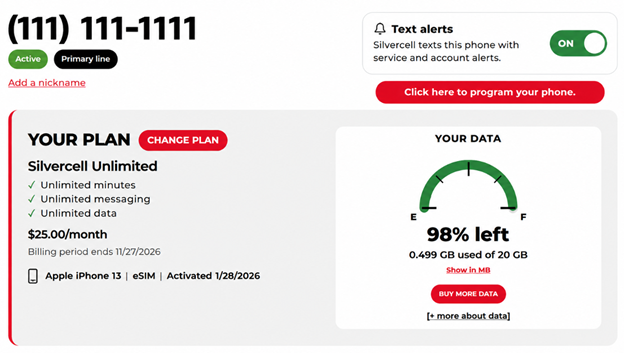
We know customers want the ability to manage their phone service without having to wait for assistance. That’s why we’ve added more self-service options to My Account. Scroll down to My Lines and click into open line details. This is where all the information for each of your lines will be.
See Your Data Usage at a Glance
Wondering how much data you have left for the month? You can now view your plan details and remaining data through a visual graph in your account.
It’s an easier way to see how much data you’ve used, how much you have remaining, and which plan you’re currently on.
Keep Your Number Safe
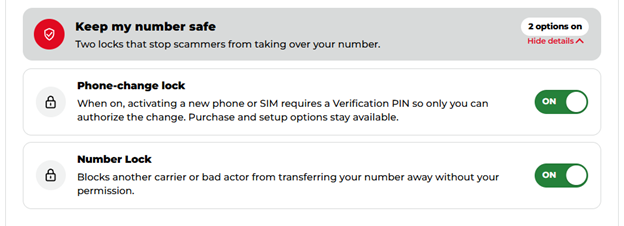
Your phone number is important, and protecting it matters. That’s why we’ve added Keep My Number Safe, which gives you two additional security options to help protect your number from unauthorized changes or transfers.
You can manage both options directly through your account:
- Phone-Change Lock: Require a verification PIN before activating a new phone or SIM card. This helps ensure only you can authorize the change.
- Number Lock: Help prevent another carrier or someone else from transferring your phone number without your permission.
You can also manage unexpected situations directly through your account. If your phone is lost or stolen, you can freeze your line to prevent someone from using your service. Keep in mind that freezing your line does not stop monthly billing.
Take Care of Common Phone Requests
Sometimes you just need to make a quick change to your phone service. Instead of contacting support for every request, you can now take care of several common tasks right from your My Account section.
Under Need Something Else?, you’ll find options to:
- Get a Replacement Phone or SIM: Shop for a replacement if your phone or SIM is lost, broken, or you’re ready to upgrade.
- Use My New Phone or SIM: Switch your service to a new phone or SIM card.
- Change Your Phone Number: Choose a new number or bring a number from another company.
- Update Your Address: Change your address and service location, which determines the taxes and fees for your line.
- Freeze Your Line: Pause service if your phone is lost or stolen. Billing continues while your line is frozen.
- Reset Your Voicemail PIN: Reset the PIN used to access your voicemail.
These options give you more flexibility and control over your account, without having to wait for assistance with everyday requests.
Manage Your Calling Features
We’ve also made it easier to manage the calling features available with your Silvercell service. Previously, some of these options required you to contact our support team. Now, you can view available features, turn them on or off, and see pricing for optional add-ons directly through My Account.
Included Features
Your account lets you manage included features such as:
- Caller ID Block: Turn on this feature to hide your phone number when making outgoing calls. People you call will see “Unknown” instead of your number.
- Voicemail: Manage your voicemail feature so callers can leave you a message when you cannot answer.
- Mobile Hotspot: Share your phone’s internet connection with other devices when you need a connection away from Wi-Fi.
Optional Paid Features
You can also add extra calling protection:
- Spam Call Warnings (only $1.00/month): Receive a warning in Caller ID when an incoming call looks like a spammer, robocall, or potential fraud.
- Caller Names and Spam Warnings (only $2.75/month): See callers’ names and numbers when available, along with warnings for potential spam, robocalls, or fraudulent calls.
The best part? You can see the available options and their monthly prices before adding anything to your bill. You stay in control of which features you want.
Easier Payments with PayPal
We know everyone has their own preferences when it comes to paying for their phone service or purchasing a new phone. That’s why we’ve added PayPal as another convenient checkout option.
Depending on your PayPal account settings, you may be able to use a linked debit card or bank account.
Need Help? We’re Still Here for You!
While we’ve added more self-service options, that doesn’t mean we’re going anywhere!
We know that sometimes you would rather have someone walk you through a process, answer a question, or help you make a change. That’s why you can still reach our customer support team through the Chat With Us option right inside My Account. You can even use the portal to complete a full phone number transfer, with the option to chat with our team if you need assistance along the way.
At Silvercell, our highly trained, 100% U.S.-based support team is always here to help.
We’re Always Listening and Always Improving
These updates are about more than adding new features. They’re about listening to what our customers need and finding ways to make managing phone service less complicated. We want you to have the freedom to handle things yourself when you want to, while knowing our support team is available whenever you need a helping hand.
Thank you for being part of Silvercell. Your feedback helps us continue to improve, and we’re always looking for new ways to make your experience better.
Log in to your Silvercell My Account today and explore what’s new!
Still need help?
Our 100% US-based team provides patient support through online chat.